
Money graph:
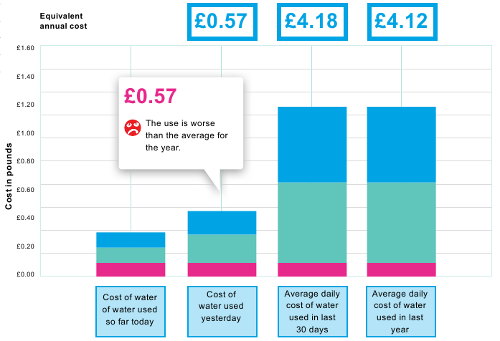
Url
https://www.temetra.com/wmsapp/dymg/wsximg?s=1&auth=ABC&m=1
Parameters
w: Width, change the width of the graph in pixels, default is 500px
h: Height, change the height of the graph in pixels, default is 200px
wp: Water price, required*, price per cube, wp=.89
sp: Sewerage price, required*, price per cube, sp = 1.14
fc: Fixed charge, required*, the fixed charge cost for the entire year, fc=40
spcnt: Sewerage Percentage, defaults to 95 if no value is provided, spcnt=80
All * values are required for a cost graph. It is also worth noting that all parameters passed, that are not listed here, will be ignored, so if you wanted to use salt for the image URL to prevent caching, the image would still work correctly.
Dynamic elements
The cost graph bars are generated using a combination of Temetra held consumption data, and the provided parameters. Temetra has all the usage data, so for example we calculate the last months water volume. We then take this volume and using the prices provided in the url, we work out the volume charge and just add the fixed charge on after the calculations. The y-axis scale is also then worked off the highest volume and is automatic. The equivalent annual cost is calculated by dividing the individual bar consumption by the number of days, and multiplying this out to a year.
Consumption graph:
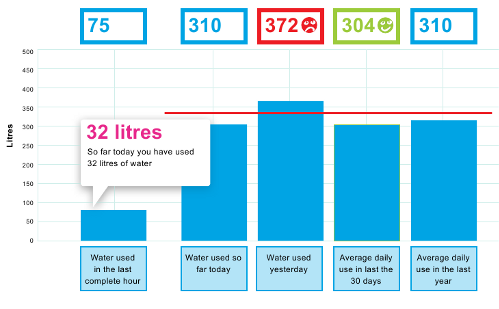
Url
https://www.temetra.com/wmsapp/dymg/wsximg?s=1&auth=ABC&m=2
Parameters
w: Width, change the width of the graph in pixels, default is 500px
h: Height, change the height of the graph in pixels, default is 200px
th: Threshold, mark the threshold on the graph, provide the value in litres, this will then display as a red line on the graph if
 the bars are within range
Dynamic elements
The consumption bars here and the yAxis are generated solely from the meter usage information stored in Temetra, the only url controlled items are the width and height of the resulting image.
Comparison graph:
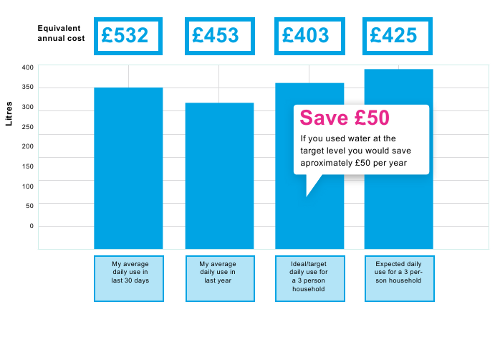
Url
https://www.temetra.com/wmsapp/dymg/wsximg?s=1&auth=ABC&m=3
Parameters
w: Width, change the width of the graph in pixels, default is 500px
h: Height, change the height of the graph in pixels, default is 200px
hhno: Household number, required*, the number of people in the household, to display on the graph
hhtar: Household target, required*, the target use in litres of this size household
hhexp: Household expected, required*, the expected use in litres of this size household
wp: Water price, required*, price per cube, wp=.89
sp: Sewerage price, required*, price per cube, sp = 1.14
fc: Fixed charge, required*, the fixed charge cost for the entire year, fc=40
spcnt: Sewerage Percentage, defaults to 95 if no value is provided, spcnt=80
Dynamic elements
This graph has 3 elements and has the highest number of parameters. The 2 consumption bars are calculated directly from Temetra flow data, like the consumption graph. The target and expected columns are provided as paramaters, based on the size of the household and then included as bars on the graph. The annual cost projections at the top of the graph require all the fields that a normal cost graph would use, and using the same method as that graph, we calculate the cost if the consumption in the bars below were over a year. As always, the width and height can be controlled by parameters too.
Daily consumption graph:
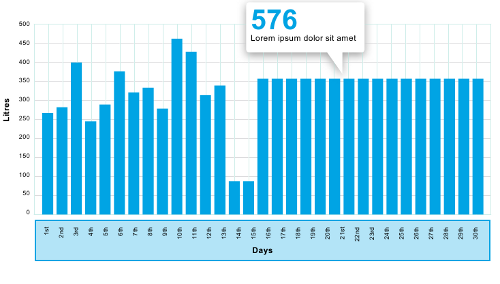
Url
https://www.temetra.com/wmsapp/dymg/wsximg?s=1&auth=ABC&m=4
Parameters
w: Width, change the width of the graph in pixels, default is 500px
h: Height, change the height of the graph in pixels, default is 200px
day: Day, specify the day for which you want the hourly data
mth: Month, specify the month for which you want the daily data
yr: Year, specify the year for which you want the daily data
from: From Date**, specify a particular date you want the data to start from
to: To Date**, specify a particular date you want the data to end on
All dates are in the format dd-mm-yyyy, eg. 04-10-2011
**The from and to date should only be used if you haven't specified a particular day, month, or year, to display. The unit used on the x-Axis will depend on the period selected, the shorter the period, the higher the data resolution
Dynamic elements
All of the consumption bars here are generated by Temetra using the stored meter usage data. The width and height parameters are the only url options for changing the style. The month parameter is required to specify what month you want the data for, if it isn’t provided, Temetra will try to use the most recent full month by default.